

THE SHORT ANSWER
For a creator-led Instagram carousel in Canva, define what viewers should understand before assigning page roles: introduce the question, demonstrate an action, retain conditions and offer an appropriate next step. Sequence is part of the explanation, and a page encountered alone should remain accurate. The brand checks facts and commercial context while the creator retains genuine expression. Export the required pages and inspect crops, text and order individually. A template, successful download or final filename does not replace review of the complete publication object.
Define what the viewer needs to understand
A carousel is not a video divided into equal picture slices. Viewers decide whether to continue, so the sequence needs a recognizable question and progressive explanation. Start with a specific task, such as understanding how an accessory sits after unfolding, rather than a broad request for engagement.
The creator brief retains the audience task, product support and next step. The creator proposes photographs, demonstrations and language. A brand need not script every expression, but it should identify facts that design must not change.
If the task depends on continuous movement, assess whether pictures can explain it or whether an appropriate video or different form is needed. Choosing Canva selects a production method; it does not establish that the content format fits. Define the task before choosing a template instead of searching for information that happens to fit an attractive layout. This makes later review concern understanding rather than taste alone.
Give each page a clear role
Start with short role statements such as question, action, condition and next step. These are not a required page count. A complex action may need more explanation, while a simple one need not acquire empty pages to make the carousel longer.
Each page should advance a practical question. Answer the opening question later, and place limitations near the relevant fact instead of hiding all conditions at the end. Check whether a person seeing one page alone might think an accessory is included when it is not.
Sequence is an editorial choice, not a performance formula. It tells both parties which information can be combined and which should remain visible, and helps assess whether another page has a purpose. Repeating a benefit is not necessarily additional explanation. A useful plan should make it possible to explain why every page exists before time is spent refining its decoration, transitions or typography.
Review the photographs as a set
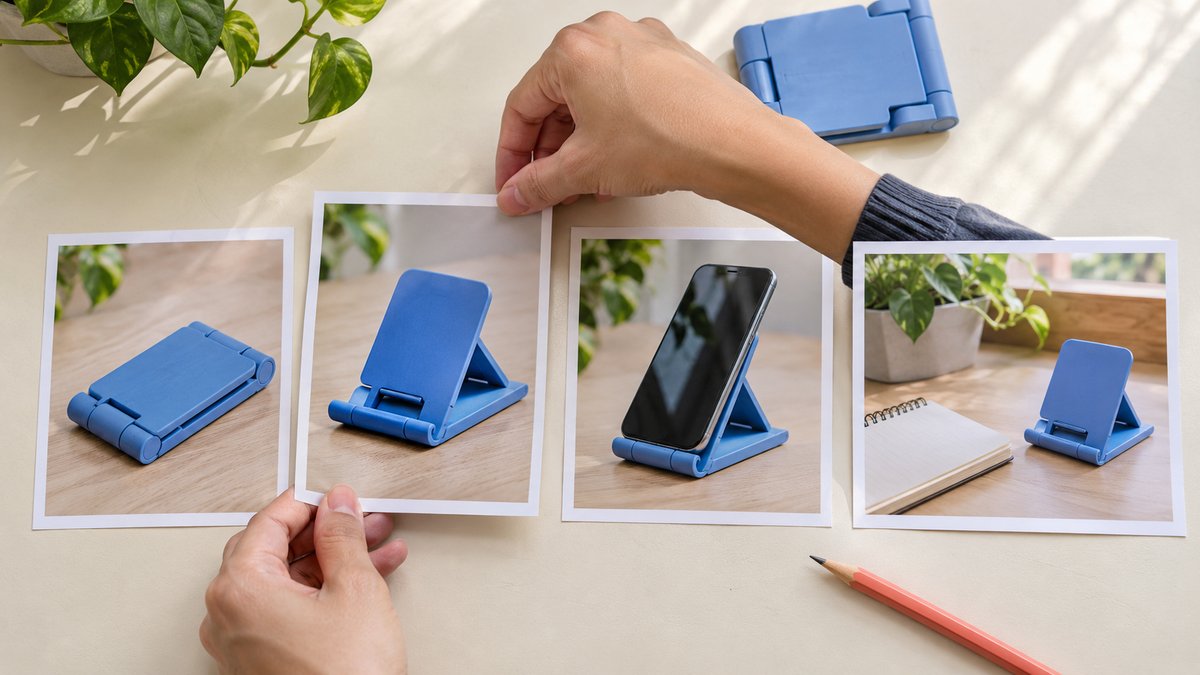
Arrange candidate photographs in the proposed order and check object consistency, action continuity and missing reference points. Physical product photographs can support preparation before a complex design is built.
The body image illustrates this review: a type of stand moves from closed to open, supporting a phone and sitting on a desk. It demonstrates sequence checking, not actual verification of a branded product or a Canva interface screenshot.
Use the correct model and suitable material in a real project. Identify differences when a sample, accessory or shooting condition changes instead of letting a layout conceal them. If a picture cannot support the intended advantage, revise the claim or obtain appropriate evidence rather than crop it into a stronger impression. Looking at the set before polishing individual pages can reveal a missing explanatory step that would be much harder to repair after every page has been approved separately.
Keep conditions visible in the layout
Text, photographs and space should support understanding. A necessary condition should not become tiny mobile text or disappear because the template area is narrow. Reduce the information on a page where necessary instead of continually shrinking the font.
Check contrast, line length and crops, especially hands, object edges and size references. A caption can explain a relevant condition but cannot rescue an image that is inaccurate in itself.
No layout fits every creator. Preserve their expression while maintaining consistent brand facts. Review feedback should identify the likely misunderstanding, such as an unclear action starting point, rather than request only a more premium feel. That feedback can become an actual revision. It also prevents the design conversation from rewarding appearance while leaving the reader unable to distinguish what the product does, which conditions apply and what the next page is supposed to explain.
Confirm the use of every material
Canva’s Content License Agreement distinguishes content and uses, including commercial-use restrictions. An element appearing in a template does not give a brand every right in work, likeness, trademarks and future uses. Appropriate owners should inspect the actual content category and intended use.
The Canva asset-kit use guide helps distinguish a template from the finished work. This article clears no particular customer asset and does not treat a paid plan as proof that every right is resolved. Creator-supplied photographs and other materials also have their own conditions.
Retain suitable provenance and use notes with the working material, especially for intended brand reuse. Those internal records need not all appear in the public carousel, but the next owner should know which material serves which route and which additional use remains for discussion. A complete-looking design should not conceal an unresolved condition that determines whether it can actually be published as planned.
Keep commercial context with the endorsement
FTC’s influencer disclosure guide emphasizes clear material-connection context with an endorsement in its US guidance. Do not assume viewers know the relationship or use a profile sentence as a substitute for applicable explanation in the content.
A carousel needs to account for somebody encountering a page alone, looking at images before copy or choosing not to continue. Appropriate wording depends on region, format and actual project conditions. This article offers no universal label conclusion.
Natural creator language can coexist with clear context. Every page need not become a contract, but necessary background should not disappear for visual tidiness. Review the final images, caption and applicable settings instead of leaving a note in the working design that never reaches the published object. The relevant question is what a viewer can understand from the material they actually encounter, not whether an internal reviewer remembers that a disclosure was once discussed.
Export the required pages and check order
Canva’s download guide describes Share, Download, file-type selection and choosing all, current or custom pages in a multipage design. Options depend on format and plan. No real account was operated or download completed for a reader here.
Choose a suitable form for the actual publication route and reconcile the exported page count and order. The design preview does not establish that unzipping, transferring and uploading preserves the sequence correctly.
Appropriate filenames can identify page order and version, but they do not replace opening the files. Check missing or duplicate pages, crops and text changes, and confirm the publisher receives the currently reviewed set rather than an older export with a similar name. This is a small operational step with a meaningful consequence: rearranging two images can change the explanation even if every individual file is accurate and visually polished.
Review the complete mobile reading path
Read every page at an actual mobile size rather than only as an editor thumbnail. Check whether the opening establishes the question, demonstrations have references, conditions and next steps remain readable, and copy agrees with images.
If a tool schedules publication, separately verify whether the account and object can preserve required material. Successful export and correct live publication are different states. Inspect the actual object afterward rather than retain only a queue screenshot.
Check visible information without collecting unrelated audience records. Retain device, time and issues instead of presenting one review as permanent availability everywhere. For a critical check that cannot be completed, assign an owner and next action. Both parties should know what remains pending rather than have the preview described as the final live result. This keeps the review useful while making its practical scope clear to whoever later takes responsibility for publication.
Rehearse a sequence for an accessory
Suppose a brand needs to explain storage and desktop footprint for a folding stand. This is not a client case. The question page establishes context, the action page shows unfolding, the condition page retains the model and excluded items, and the next step leads to appropriate product information.
A claim that it suits every desk would need different evidence; one photograph cannot establish it. If footprint is the missing explanation, improve the reference instead of adding another page repeating a benefit.
When the brand adds a language or use, reconfirm version and scope. A clear demonstration can have different sequences, but each should retain facts and necessary conditions. The exercise produces a reviewable assignment, not a guarantee that one order creates more saves, clicks or purchases. Its value is that both parties can explain why the selected pages belong together and which question remains unanswered if a page is removed.
Hand over the complete publication set
The handoff should locate the current file set, order, caption, necessary sources, use conditions and open items. Both parties should confirm the same object rather than silently combine new copy with old images.
Review outcomes against the original task: whether the explanation is clear, what questions remain and what suitable fields actually recorded. Completed design is not sales evidence, and one counter change cannot establish that a layout must be effective.
Canva can support production, but a useful creator carousel comes from accurate facts, an understandable sequence and actual review. Tell the next owner what was received, why it is arranged that way and what remains to confirm. The work can then enter a reliable collaboration instead of remaining a template that merely looks finished. This is an assessable production result even when later audience behavior is mixed or cannot be attributed to page order alone.
Research date and limitations
Sources reviewed November 16, 2026. Methods, tables and decision rules are editorial recommendations. Hypothetical examples are not actual client results or industry benchmarks. Source geography and periods are specified where relevant.
Page roles in a creator carousel
An editorial sequence framework, not a required page count or performance guarantee. The accessory example is hypothetical.
| Role | Explanation task | Check |
|---|---|---|
| Question | Identify what the viewer should understand | Later pages answer it |
| Action | Show steps and references | Objects and conditions are consistent |
| Condition | Retain model, limits and relevant context | A single page remains accurate |
| Next step | Reach accurate information or a suitable action | Copy and destination agree |
CHECKLIST
Before delivering the carousel
Make the image set ready for accurate publication.
- Define one audience-understanding task.
- Assign a clear role and order to each page.
- Check facts, material use and commercial context.
- Open every exported file and reconcile order.
- Review crops and readability on mobile.
- Hand over the current set, copy and open items.
Sources and further reading
External pages can change. Recheck platform rules, contracts and local law before launch.